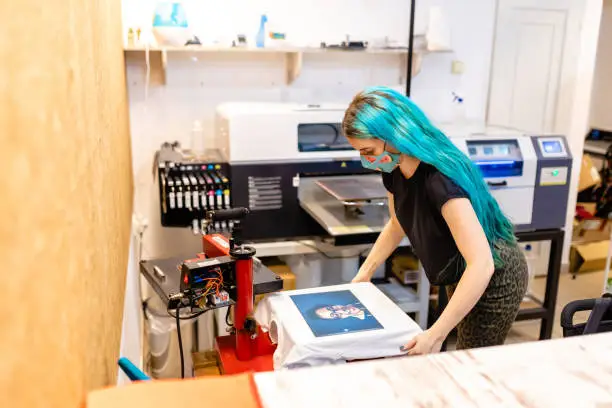
T-shirt printing machines help you put designs on shirts. They come in different types for various needs. Some work best for big orders, others for small ones. As an SEO expert, I know picking the right machine can boost your business. This guide covers the main types. Each section explains how they work, what you need, and their good and bad points. If you want to buy one, check out https://www.dtflinko.com/ for options.
Screen Printing Machines
Screen printing is one of the oldest ways to print on t-shirts. It uses a mesh screen to push ink through onto the fabric. This method is great for large batches because it is fast once set up.
To use it, first make a stencil on the screen for each color. Coat the screen with a light-sensitive mix, then expose it to light with your design. Wash away the soft parts to leave holes for ink. Place the screen on the shirt and squeegee ink across it. Repeat for each color.
You need screens, inks, a press, and a drying area. Manual presses are cheap for starters, but auto ones speed up big jobs.
The good side is the low cost per shirt for many prints. Colors stay bright and last long. It works on most fabrics.
The bad side is that the setup takes time. It is not good for one-off designs or photos with many colors. Waste can happen if you mess up a screen.
Many shops use this for team shirts or events.
Direct to Garment (DTG) Printers
DTG printers work like a home inkjet, but for clothes. They spray ink right onto the shirt. This is good for detailed designs with lots of colors.
First, pretreat the shirt with a spray to help the ink stick. Load the shirt on a flat bed in the printer. Send your design from a computer. The printer moves over the shirt and prints it.
You need a DTG printer, special inks, pretreatment liquid, and a heat press to set the ink.
Pros include easy setup for small runs. You can print photos or complex art. No screens mean quick changes.
Cons are the high cost of the machine and the links. It works best on cotton, not dark fabrics, without white ink. Prints can fade if not cared for.
This type suits custom online stores.
Heat Press Machines
Heat press machines transfer designs from paper or vinyl to shirts using heat and pressure. They are simple and cheap to start with.
Cut or print your design on transfer material. Place it on the shirt. Close the press to apply heat and pressure for a set time. Peel off the backing.
You need a heat press, transfer papers or vinyl, and a cutter for shapes.
Good points are low setup cost and easy use. Works on many items besides shirts.
Bad points are it can feel thick on the shirt. Not ideal for very detailed work. Vinyl might crack over time.
Hobbyists often use this for personal projects.
Direct to Film (DTF) Printers
DTF printers print on a film first, then transfer it to the shirt. This method is growing popular for its flexibility.
Print your design on a special film with pigment inks. Add adhesive powder while the ink is wet. Heat to cure it. Cut out the design and press it onto the shirt.
Equipment includes a DTF printer, films, powder, a shaker, and a heat press.
Advantages are bright colors on any fabric color. Suitable for small or large orders. Transfers last well in washes.
Disadvantages include powder mess and the need for good ventilation. Initial cost is medium.
Businesses like it for mixed fabric types.
Vinyl Cutter Machines
Vinyl cutters cut designs from colored vinyl sheets. You then heat-press them onto shirts.
Use software to design and send it to the cutter. It cuts the shape. Weed out extra vinyl. Press onto the shirt.
You need a cutter, vinyl rolls, weeding tools, and a heat press.
Pros are durable prints that do not fade. Good for simple logos or numbers. Cheap materials.
Cons are limited to solid colors, no gradients. Time-consuming for complex designs.
Sports teams use this for jerseys.
Sublimation Printers
Sublimation turns ink into a gas to dye the fabric. It works only on polyester or coated items.
Print on special paper with dye inks. Place paper on shirt. Heat press to transfer.
Needs a sublimation printer, inks, paper, and press.
Benefits are soft feel, no cracking. Colors are vibrant and permanent.
Drawbacks are limited to light polyester. High heat needed, not for cotton.
Ideal for all-over prints on sportswear.
Embroidery Machines
Embroidery machines stitch designs with thread. It is not printing, but is often used on t-shirts.
Digitize your design into stitches. Hoop the shirt. The machine sews it.
Requires an embroidery machine, threads, stabilizers, and software.
Strong points are a professional look and durability. Good for logos.
Weak points are the high cost and the slow processing for big areas. Not for photos.
Companies use it for uniforms.
Laser Printers for Transfers
Some use laser printers for toner transfers. Print on transfer paper, then press.
Simple setup with a standard laser printer.
Pros are a cheap entry. Good for testing.
Cons are limited quality. Toner can be washed off.
Not for heavy use.
Factors to Consider When Choosing a Machine
Think about your needs. For enormous volumes, go with screen printing. For customs, try DTG or DTF.
Budget matters. Start small if new.
Space and power are key. Some machines are big.
Learn the skills. Each type has a curve.
Maintenance keeps them running.
Maintenance Tips for All Machines
Clean regularly. Follow maker guides.
Store inks and materials properly.
Check parts for wear.
This prevents downtime.
Cost Comparison
Screen setup costs $500 up. DTG starts at $10,000.
The heat press is $200. DTF around $5,000.
Vinyl cutter $300. Sublimation $1,000.
Embroidery $2,000 plus.
Factor in supplies.
Future Trends
Machines get smarter with auto features.
Eco inks rise.
Hybrid types combine methods.
Stay updated.
Conclusion
T-shirt printing machines vary by type. Screen for bulk, DTG for detail, heat press for ease, DTF for versatility, vinyl for simplicity, sublimation for poly, embroidery for stitch, and laser for basic. Pick based on your goals. Start with research and practice. This field offers chances for creativity and profit.